1. Copy the MegaL II.prc files to your desktop computer.
2. Install the software by using the Palm's Install Tool program.
3. From your Palm computer, run a HotSync operation. MegaLauncher will be transferred from your desktop computer to your Palm computer.
I use Enhanced Pilot App Installer V 0.32, which is freeware.
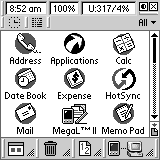
1. Clock/date/day of week
2. Battery capacity in volt / %
3. Used memory / Free memory / CPU frequency.
4. Button for: Contrast (colored devices)/ Backlight (for monochrome devices)
5. Device disengagement (Power off)
6. Graphic clock with world time
7. Standard Palm OS programs and exit from MegaLauncher program
8. Category support
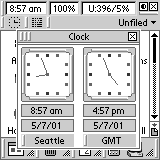 Graphic clock
Graphic clock allows you to set two cities at a time. In order to change the current city press the button with the key-top marking of the city and select the required city in the "Select city" menu. You can delete, add new or edit the existent cities in this list.
Standard Palm OS programs
Here are the most popular and widely used Palm OS applications. In order to revert to MegaLauncher after these applications starting press the "Appl" key (it is situated left of "Graffiti" field). In order to exit from the MegaLauncher program select the menu item "Exit MegaL II".
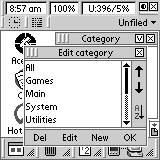 Categories
The category list can be opened by pressing the current category and closed by pressing the "X" symbol or by touching any point of the screen field outside the category. To edit the category list press "V" symbol. In the edit box you can delete, change the name or create a new category. You can change the position of the selected category in the up-down list or with the help of an arrow or classify the list according to the alphabetical order. After all changes are made press "OK". You can also use "Drag and Drop" function for changing the category for the certain application. In order to do this, pull any application to the upper key of the current category and select in the category menu the category where you want the application to be transferred.
"Tabs view" mode
You can use this mode in "MegaLauncher Preferences". To open the whole category list press the "triangle" symbol in the left part of categories To change the application category use "Drag and Drop" function and pull the icon to the category where you want to move the application.
Lower panel
All lower icons are multifunctional. After pressing the icon the appropriate box opens. The icon list appears after pressing the area to the right of the icon. The chosen icon is stored and can be changed by touching the selection area. A new icon can also be selected here.
Bottom toolbar icons
1. Big icons displaying after touching the right field you can choose the amount of columns for this type of display.
2. Small icons displaying - after touching the right field you can choose the amount of columns for this type of display.
3. Displaying of all the applications according to groups.
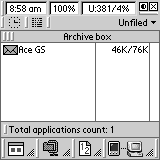 Use the "Drag and Drop" function for activating the functions mentioned below:
1. Archive Box. If there are some rarely used applications in your device you can put them into "Archive Box". Each application, placed in "Archive Box" is compressed and as a result you save up to 50% of memory.
2. Info Box. All the information about applications and database that your device has.
3. Beam Box. Allows you to transfer any application to another device.
4. Trash Box. All the applications sent to "Trash Box" can be restored or deleted completely.
Use the "Drag and Drop" function to do the following:
1. Hot Appl. This is the list of the frequently used applications. You can pull any application into this list or after opening the list press the triangle symbol.
2. Recent list. In this list 10 the most frequently used applications are registered automatically. This information is statistical and allows you to start the application in the quickest way.
3. Common list. . In this list 10 applications used last are registered automatically. This information is statistical and allows you to start the application in the quickest way.
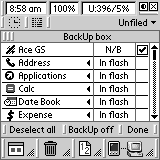 1. Back UP Box. This function allows you to store the marked applications in your PC. In order to do this, you should mark the applications to be transferred to PC. To activate this process you press "BackUP off" key.
"BackUP on" state will allow you during synchronization to transfer all the marked files into "Backup" folder on your PC (directory ñ :\Palm\Backup).
1. Back UP Box. This function allows you to store the marked applications in your PC. In order to do this, you should mark the applications to be transferred to PC. To activate this process you press "BackUP off" key.
"BackUP on" state will allow you during synchronization to transfer all the marked files into "Backup" folder on your PC (directory ñ :\Palm\Backup).2. TestCenter. Diagnostic utilities allow you to test the serviceability of all the keys and also to check the screen quality of your device.
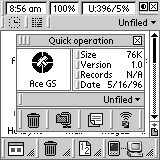 "Touch and Wait" function
With any application icon pressed and held the "Touch and Wait" function (Quick operation) is activated automatically. It allows to delete, archive, rename or transfer the selected application to another device. In this box you can activate the selected application or change the category. The "Touch and Wait" function is an alternative for "Drag and Drop". You can regulate time of holding after which this menu appears in MegaLauncher Preferences.
Full screen mode
After pressing this icon the MegaLauncher changes over to full screen mode. To return to the standard mode press the icon one more time.
MegaLauncher II Preferences
In order to activate preferences press the "Menu icon" key.
1. Color - selecting the color shade
2. Timeout - regulation of time interval for "Touch and Wait" function.
3. Category standard category view or "Tabs view"
4. Trash total deletion of "Trash Box" database
5. Archive total deletion of "Archive Box" database
6. Sound volume control
Press "Accept" after all the changes made.
Version: 2.3
Category: enhancements
RAM usage (kb): 172
Type: shareware
Palm OS version: 3.0, 3.1, 3.3, 3.5, 4.0
Device support: Palm, Sony, Visor, TRG
Display support: B&W, 4 grays, 16 grays, 256 colors
Free usage of the MegaLauncher program is limited by time (14 days). If you want to buy it, go to: http://www.megasoft2000.com
* Many different modes of use (Standard/Full Screen, Big/Small Icon Display/Groups).
* Archive box
* Beam box
* Trash can
